

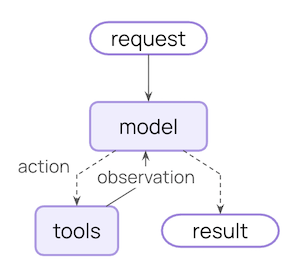
What can middleware do?
Monitor
Track agent behavior with logging, analytics, and debugging
Modify
Transform prompts, tool selection, and output formatting
Control
Add retries, fallbacks, and early termination logic
Enforce
Apply rate limits, guardrails, and PII detection
create_agent:
Built-in middleware
LangChain provides prebuilt middleware for common use cases:Summarization
Automatically summarize conversation history when approaching token limits.Configuration options
Configuration options
string
required
Model for generating summaries
number
Token threshold for triggering summarization
number
default:"20"
Recent messages to preserve
function
Custom token counting function. Defaults to character-based counting.
string
Custom prompt template. Uses built-in template if not specified.
string
default:"## Previous conversation summary:"
Prefix for summary messages
Human-in-the-loop
Pause agent execution for human approval, editing, or rejection of tool calls before they execute.Configuration options
Configuration options
dict
required
Mapping of tool names to approval configs. Values can be
True (interrupt with default config), False (auto-approve), or an InterruptOnConfig object.string
default:"Tool execution requires approval"
Prefix for action request descriptions
InterruptOnConfig options:list[string]
List of allowed decisions:
"approve", "edit", or "reject"string | callable
Static string or callable function for custom description
Important: Human-in-the-loop middleware requires a checkpointer to maintain state across interruptions.See the human-in-the-loop documentation for complete examples and integration patterns.
Anthropic prompt caching
Reduce costs by caching repetitive prompt prefixes with Anthropic models.Learn more about Anthropic Prompt Caching strategies and limitations.
Configuration options
Configuration options
string
default:"ephemeral"
Cache type. Only
"ephemeral" is currently supported.string
default:"5m"
Time to live for cached content. Valid values:
"5m" or "1h"number
default:"0"
Minimum number of messages before caching starts
string
default:"warn"
Behavior when using non-Anthropic models. Options:
"ignore", "warn", or "raise"Model call limit
Limit the number of model calls to prevent infinite loops or excessive costs.Configuration options
Configuration options
Tool call limit
Control agent execution by limiting the number of tool calls, either globally across all tools or for specific tools. To limit tool calls globally across all tools or for specific tools, settool_name. For each limit, specify one or both of:
- Thread limit (
thread_limit) - Max calls across all runs in a conversation. Persists across invocations. Requires a checkpointer. - Run limit (
run_limit) - Max calls per single invocation. Resets each turn.
Configuration options
Configuration options
string
Name of specific tool to limit. If not provided, limits apply to all tools globally.
number
Maximum tool calls across all runs in a thread (conversation). Persists across multiple invocations with the same thread ID. Requires a checkpointer to maintain state.
None means no thread limit.number
Maximum tool calls per single invocation (one user message → response cycle). Resets with each new user message.
None means no run limit.Note: At least one of thread_limit or run_limit must be specified.string
default:"continue"
Behavior when limit is reached:
"continue"(default) - Block exceeded tool calls with error messages, let other tools and the model continue. The model decides when to end based on the error messages."error"- Raise aToolCallLimitExceededErrorexception, stopping execution immediately"end"- Stop execution immediately with a ToolMessage and AI message for the exceeded tool call. Only works when limiting a single tool; raisesNotImplementedErrorif other tools have pending calls.
Model fallback
Automatically fallback to alternative models when the primary model fails.Configuration options
Configuration options
PII detection
Detect and handle Personally Identifiable Information in conversations.Configuration options
Configuration options
string
required
Type of PII to detect. Can be a built-in type (
email, credit_card, ip, mac_address, url) or a custom type name.string
default:"redact"
How to handle detected PII. Options:
"block"- Raise exception when detected"redact"- Replace with[REDACTED_TYPE]"mask"- Partially mask (e.g.,****-****-****-1234)"hash"- Replace with deterministic hash
function | regex
Custom detector function or regex pattern. If not provided, uses built-in detector for the PII type.
boolean
default:"True"
Check user messages before model call
boolean
default:"False"
Check AI messages after model call
boolean
default:"False"
Check tool result messages after execution
To-do list
Equip agents with task planning and tracking capabilities for complex multi-step tasks. Just as humans are more effective when they write down and track tasks, agents benefit from structured task management to break down complex problems, adapt plans as new information emerges, and provide transparency into their workflow. You may have noticed patterns like this in Claude Code, which writes out a to-do list before tackling complex, multi-part tasks.This middleware automatically provides agents with a
write_todos tool and system prompts to guide effective task planning.Configuration options
Configuration options
LLM tool selector
Use an LLM to intelligently select relevant tools before calling the main model.Configuration options
Configuration options
string | BaseChatModel
Model for tool selection. Can be a model string or
BaseChatModel instance. Defaults to the agent’s main model.string
Instructions for the selection model. Uses built-in prompt if not specified.
number
Maximum number of tools to select. Defaults to no limit.
list[string]
List of tool names to always include in the selection
Tool retry
Automatically retry failed tool calls with configurable exponential backoff.Configuration options
Configuration options
number
default:"2"
Maximum number of retry attempts after the initial call (3 total attempts with default)
list[BaseTool | str]
Optional list of tools or tool names to apply retry logic to. If
None, applies to all tools.tuple[type[Exception], ...] | callable
default:"(Exception,)"
Either a tuple of exception types to retry on, or a callable that takes an exception and returns
True if it should be retried.string | callable
default:"return_message"
Behavior when all retries are exhausted. Options:
"return_message"- Return a ToolMessage with error details (allows LLM to handle failure)"raise"- Re-raise the exception (stops agent execution)- Custom callable - Function that takes the exception and returns a string for the ToolMessage content
number
default:"2.0"
Multiplier for exponential backoff. Each retry waits
initial_delay * (backoff_factor ** retry_number) seconds. Set to 0.0 for constant delay.number
default:"1.0"
Initial delay in seconds before first retry
number
default:"60.0"
Maximum delay in seconds between retries (caps exponential backoff growth)
boolean
default:"true"
Whether to add random jitter (±25%) to delay to avoid thundering herd
LLM tool emulator
Emulate tool execution using an LLM for testing purposes, replacing actual tool calls with AI-generated responses.Configuration options
Configuration options
list[str | BaseTool]
List of tool names (str) or BaseTool instances to emulate. If
None (default), ALL tools will be emulated. If empty list, no tools will be emulated.string | BaseChatModel
default:"anthropic:claude-3-5-sonnet-latest"
Model to use for generating emulated tool responses. Can be a model identifier string or BaseChatModel instance.
Context editing
Manage conversation context by trimming, summarizing, or clearing tool uses.Configuration options
Configuration options
list[ContextEdit]
default:"[ClearToolUsesEdit()]"
List of
ContextEdit strategies to applystring
default:"approximate"
Token counting method. Options:
"approximate" or "model"ClearToolUsesEdit options:number
default:"100000"
Token count that triggers the edit
number
default:"0"
Minimum tokens to reclaim
number
default:"3"
Number of recent tool results to preserve
boolean
default:"False"
Whether to clear tool call parameters
list[string]
default:"()"
List of tool names to exclude from clearing
string
default:"[cleared]"
Placeholder text for cleared outputs
Custom middleware
Build custom middleware by implementing hooks that run at specific points in the agent execution flow. You can create middleware in two ways:- Decorator-based - Quick and simple for single-hook middleware
- Class-based - More powerful for complex middleware with multiple hooks
Decorator-based middleware
For simple middleware that only needs a single hook, decorators provide the quickest way to add functionality:Available decorators
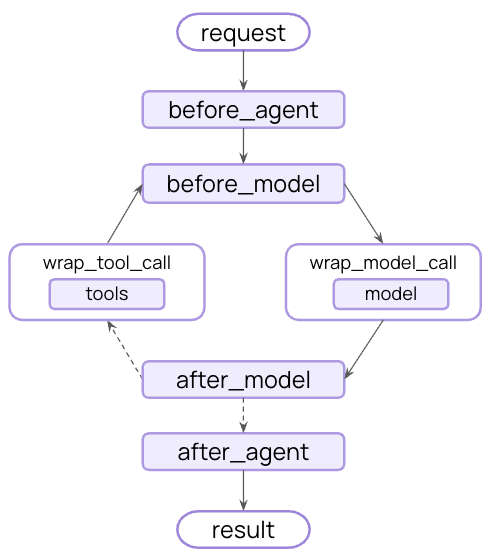
Node-style (run at specific execution points):@before_agent- Before agent starts (once per invocation)@before_model- Before each model call@after_model- After each model response@after_agent- After agent completes (once per invocation)
@wrap_model_call- Around each model call@wrap_tool_call- Around each tool call
@dynamic_prompt- Generates dynamic system prompts (equivalent to@wrap_model_callthat modifies the prompt)
When to use decorators
Use decorators when
• You need a single hook
• No complex configuration
• No complex configuration
Use classes when
• Multiple hooks needed
• Complex configuration
• Reuse across projects (config on init)
• Complex configuration
• Reuse across projects (config on init)
Class-based middleware
Two hook styles
Node-style hooks
Run sequentially at specific execution points. Use for logging, validation, and state updates.
Wrap-style hooks
Intercept execution with full control over handler calls. Use for retries, caching, and transformation.
Node-style hooks
Run at specific points in the execution flow:before_agent- Before agent starts (once per invocation)before_model- Before each model callafter_model- After each model responseafter_agent- After agent completes (up to once per invocation)
Wrap-style hooks
Intercept execution and control when the handler is called:wrap_model_call- Around each model callwrap_tool_call- Around each tool call
Custom state schema
Middleware can extend the agent’s state with custom properties. Define a custom state type and set it as thestate_schema:
Execution order
When using multiple middleware, understanding execution order is important:Execution flow (click to expand)
Execution flow (click to expand)
Before hooks run in order:
middleware1.before_agent()middleware2.before_agent()middleware3.before_agent()
middleware1.before_model()middleware2.before_model()middleware3.before_model()
middleware1.wrap_model_call()→middleware2.wrap_model_call()→middleware3.wrap_model_call()→ model
middleware3.after_model()middleware2.after_model()middleware1.after_model()
middleware3.after_agent()middleware2.after_agent()middleware1.after_agent()
before_*hooks: First to lastafter_*hooks: Last to first (reverse)wrap_*hooks: Nested (first middleware wraps all others)
Agent jumps
To exit early from middleware, return a dictionary withjump_to:
"end": Jump to the end of the agent execution"tools": Jump to the tools node"model": Jump to the model node (or the firstbefore_modelhook)
before_model or after_model, jumping to "model" will cause all before_model middleware to run again.
To enable jumping, decorate your hook with @hook_config(can_jump_to=[...]):
Best practices
- Keep middleware focused - each should do one thing well
- Handle errors gracefully - don’t let middleware errors crash the agent
- Use appropriate hook types:
- Node-style for sequential logic (logging, validation)
- Wrap-style for control flow (retry, fallback, caching)
- Clearly document any custom state properties
- Unit test middleware independently before integrating
- Consider execution order - place critical middleware first in the list
- Use built-in middleware when possible, don’t reinvent the wheel :)
Examples
Dynamically selecting tools
Select relevant tools at runtime to improve performance and accuracy.Additional resources
- Middleware API reference - Complete guide to custom middleware
- Human-in-the-loop - Add human review for sensitive operations
- Testing agents - Strategies for testing safety mechanisms